 Rainbook
Architecture Diagram (rainbook-mail-sync)
Rainbook Mail Sync brings your team's customer email and meetings onto Rainbook's records in Jira. It runs on Atlassian Forge, next to Rainbook in your Jira site, and keeps everything it captures in that site: there is no server of ours in between.
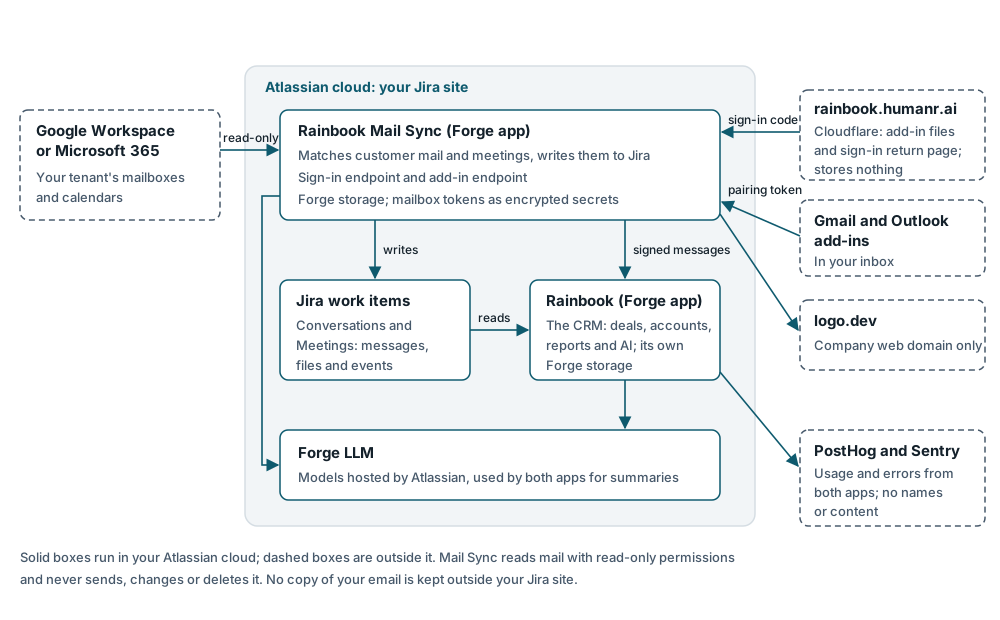
The parts
| Part | Where it runs | What it does |
|---|---|---|
| Rainbook Mail Sync | Atlassian Forge, installed on your Jira site | Reads the mailboxes and calendars your admin connects, matches messages and meetings to customers, and writes them to Jira |
| Rainbook | Atlassian Forge, installed on the same site | The CRM: deals, accounts, contacts, reports and AI, reading what Mail Sync captures through Jira |
| Your Jira site | Atlassian's cloud | Holds every captured message, file and meeting as comments and attachments on Conversation and Meeting work items |
| Forge storage | Atlassian's cloud, in your site's data residency region | Each app's own storage, encrypted at rest; Mail Sync keeps mailbox tokens as encrypted Forge secrets |
| Forge LLM | Atlassian's cloud | Classifies and summarises captured threads on the Standard and Advanced editions |
| Google Workspace or Microsoft 365 | Your organisation's tenant | The mailboxes and calendars your admin connects, read with read-only permissions |
| Rainbook CRM for Gmail and for Outlook | Inside Gmail and Outlook | Show the records behind the email you have open, and log it when you ask |
| rainbook.humanr.ai | Cloudflare | Serves the Outlook add-in's files and the sign-in return page; stores nothing |
How data moves
- Connect. Your admin connects Google Workspace or Microsoft 365 from Mail Sync's admin page. The provider's sign-in returns through rainbook.humanr.ai straight to Mail Sync's sign-in endpoint on Forge; the one-time code passes through and is never stored. Mail Sync keeps the resulting token as an encrypted Forge secret.
- Capture. Mail Sync reads new mail and calendar events from Google's or Microsoft's APIs, read-only. Messages with your customers, their files within the size limit and their meetings are written to Jira work items in your site (with the Regulated pack, bodies and files go to Forge storage instead; see the Regulated pack page). Nothing leaves your Atlassian cloud on the way.
- Share with Rainbook. Mail Sync and Rainbook share no storage. They exchange signed messages through Jira and one Rainbook endpoint that accepts signed messages from Mail Sync only, so Rainbook can link each thread to the right account and deal.
- See it in your inbox. The Gmail and Outlook add-ins call Mail Sync's add-in endpoint with a pairing token that belongs to one person, and show only what that person can see in Jira.
- Add company logos. When Mail Sync adds or enriches an account, it asks logo.dev for the company's logo by its web domain, and nothing else.
What never happens
- Mail Sync never sends, changes or deletes mail or calendar events.
- Neither app runs a server or database outside Atlassian, and no copy of your email is kept outside your Jira site.
- Rainbook itself calls nothing outside Atlassian except usage analytics and error reports, which carry no names, email addresses or content.
- From January, imports from Salesforce, HubSpot and Pipedrive, enrichment from Apollo and People Data Labs, exchange rates and contract opportunities run only when your admin turns each one on.
- In a later release, Mail Sync can send alerts to Slack or Microsoft Teams, events to Zapier or Make, search terms to Brave Search, and AI requests to Anthropic, OpenAI or Microsoft Azure AI (Azure OpenAI or Azure AI Foundry), each with your organisation's own account or key. Nothing is sent to any of them until your admin connects it.
Every company that processes data for the apps is on the subprocessor list. What Mail Sync's app logs hold, and for how long, is on Data Handling.